Neil Mahajan
Personal Project
December 2025

Productivity Timer

A productivity timer application for tracking time spent on various tasks with custom tags, session management, and comprehensive statistics across time periods.

Go
Gin
HTMX
Alpine.js
Templ
MongoDB
OAuth
Goth
Swagger
Railway
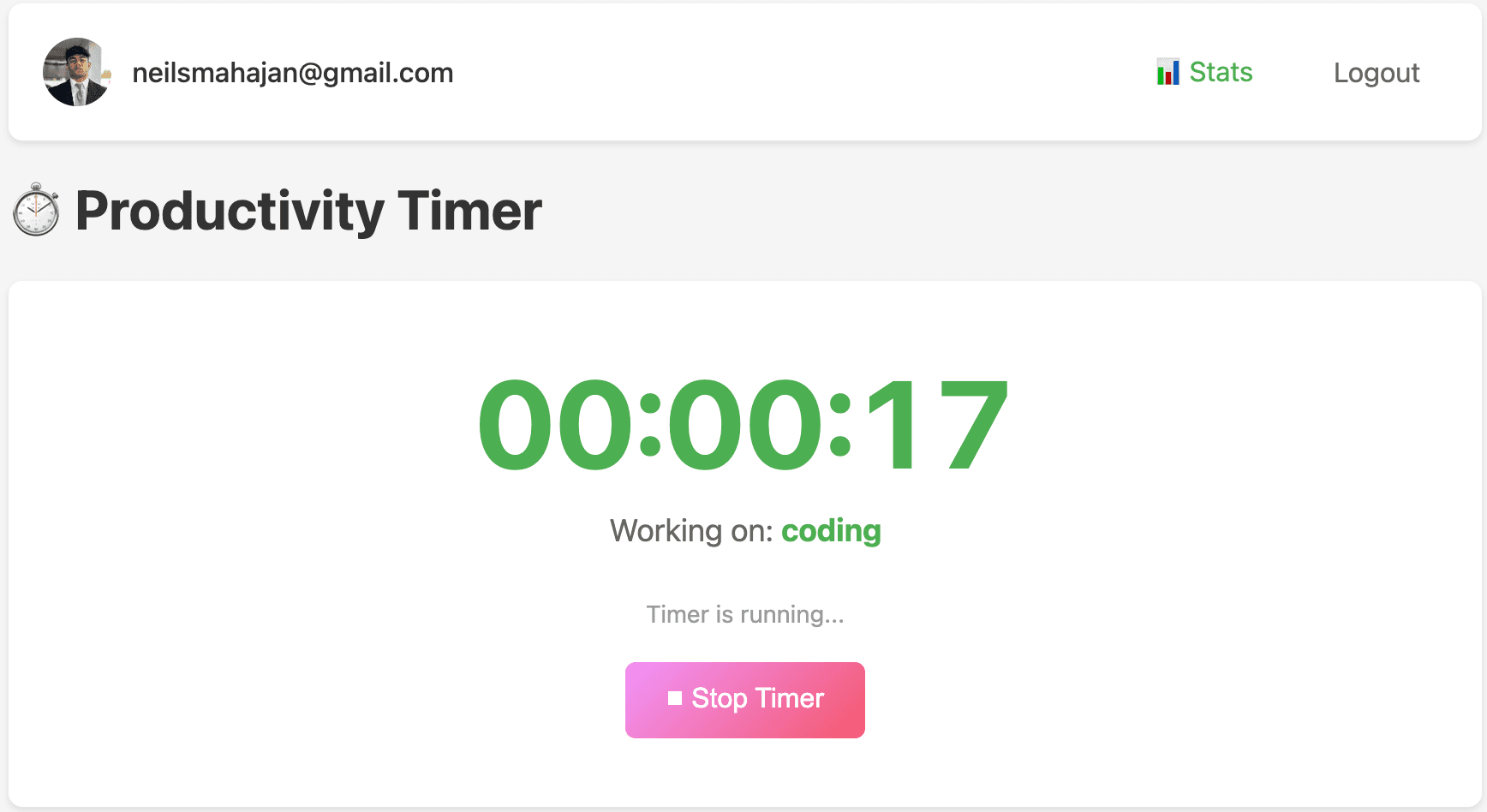
Productivity Timer - Running Timer

Project Overview

Productivity Timer is a full-stack web application designed to help users track and manage their time across various tasks. The application allows users to start stopwatch-style timer sessions while assigning custom tags to categorize their work. All session data is saved to the user's profile, enabling them to analyze their productivity patterns and understand where they're spending their time across different time periods.

Built with a modern Go backend using the Gin web framework, the application leverages HTMX for dynamic page updates without writing JavaScript, Alpine.js for lightweight client-side interactivity, and Templ for type-safe HTML templating. MongoDB provides flexible document storage for user sessions and statistics, while OAuth authentication via Goth ensures secure access with multiple provider support.

The application is deployed on Railway with continuous deployment from the main branch, featuring comprehensive API documentation via Swagger and a CI/CD pipeline using GitHub Actions for linting, testing, building, and security scanning.

Key Features

  • Timer Sessions: Start, stop, and reset timer sessions with an intuitive stopwatch interface that tracks time in real-time.
  • Custom Tags: Assign custom tags to each timer session to categorize and organize your work activities.
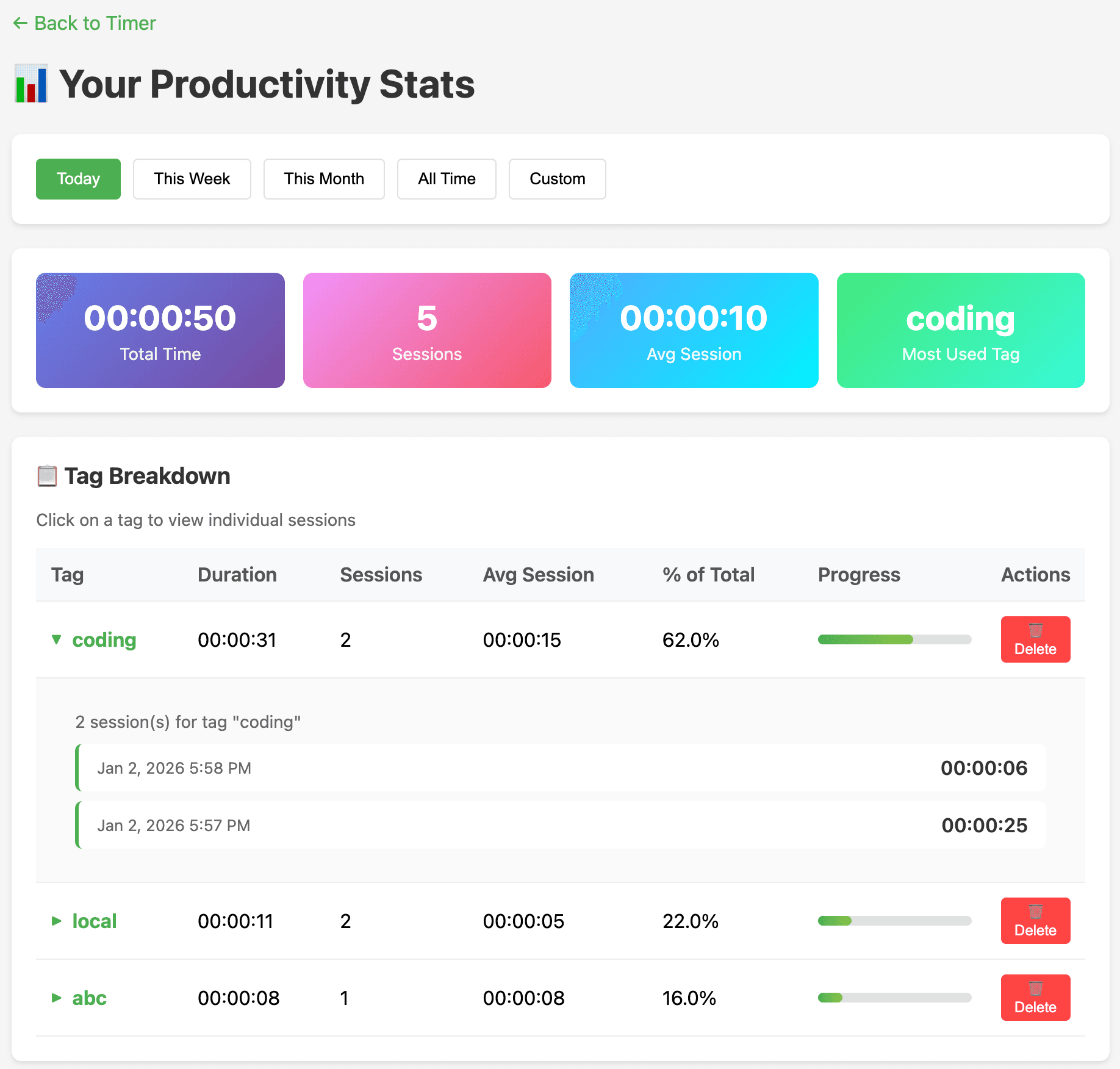
  • Statistics Dashboard: View comprehensive statistics and summaries of time spent on tasks, organized by tag and time period.
  • OAuth Authentication: Secure multi-provider authentication supporting Google, GitHub, and other OAuth providers via the Goth library.
  • Session History: Access detailed history of all timer sessions with the ability to view, filter, and manage past entries.
  • Time Period Analysis: Analyze productivity patterns across different time periods to identify trends and optimize workflows.
  • Real-time Updates: HTMX enables seamless page updates without full page reloads, providing a smooth user experience.
  • API Documentation: Full Swagger/OpenAPI documentation for all API endpoints, accessible through the built-in Swagger UI.

System Architecture

Productivity Timer follows a clean, modular architecture with clear separation between the API layer, business logic, and data access:

Backend (Go + Gin)

The core of the application is built with Go using the Gin web framework for high-performance HTTP routing. The codebase is organized into distinct packages: cmd/api for the application entrypoint, internal/server for HTTP handlers and routing, internal/auth for authentication logic, internal/database for MongoDB operations, and internal/models for data structures.

Frontend (HTMX + Alpine.js + Templ)

The frontend leverages a hypermedia-driven approach using HTMX, which enables dynamic page updates by exchanging HTML fragments with the server rather than JSON. Alpine.js provides lightweight client-side interactivity for the timer functionality, while Templ generates type-safe HTML templates that compile to Go code.

Database (MongoDB)

MongoDB provides flexible document storage for user profiles, timer sessions, and aggregated statistics. The schema-less nature allows for easy evolution of the data model as new features are added.

Authentication (OAuth via Goth)

The Goth library handles OAuth authentication flows, supporting multiple providers including Google and GitHub. This allows users to sign in with their existing accounts without creating new credentials.

API Endpoints

The API follows RESTful conventions with versioned endpoints under /api/v1. Auth routes remain at the root level for OAuth provider compatibility:

Authentication Routes

GET /auth/:provider - Initiate OAuth flow

GET /auth/:provider/callback - OAuth callback handler

GET /logout/:provider - Logout and clear session

Timer Routes

POST /api/v1/timer/start - Start a new timer session

POST /api/v1/timer/stop - Stop the current timer

POST /api/v1/timer/reset - Reset/complete the timer session

Statistics Routes

GET /api/v1/stats/summary - Get overall stats summary

GET /api/v1/stats/tag/:tag/sessions - Get sessions for a specific tag

DELETE /api/v1/stats/tag/:tag - Delete tag and all associated sessions

Technical Implementation

HTMX Integration

HTMX powers the dynamic interactions throughout the application. When users start, stop, or reset timers, HTMX sends AJAX requests to the server and swaps the returned HTML fragments directly into the DOM. This approach eliminates the need for a separate frontend build process and reduces JavaScript complexity while maintaining a responsive user experience.

Templ Type-Safe Templates

Templ provides compile-time type checking for HTML templates, catching errors before runtime. Templates are defined as Go functions that return templ.Component, enabling composition and reuse while maintaining full IDE support with autocomplete and error detection.

Alpine.js Timer Logic

Alpine.js handles the client-side timer display, updating the elapsed time in real-time without requiring server round trips. The lightweight framework integrates seamlessly with HTMX, managing local state while HTMX handles server communication.

Swagger Documentation

API documentation is automatically generated using swag from annotations in the Go handler functions. The Swagger UI is accessible at /swagger/index.html, providing interactive API exploration and testing capabilities.

Project Structure

productivity-timer/
├── cmd/api/              # Application entrypoint
├── docs/                 # Generated Swagger/OpenAPI documentation
├── internal/
│   ├── auth/             # Authentication logic
│   ├── database/         # Database operations
│   ├── models/           # Data models
│   └── server/           # HTTP handlers and routing
└── web/templates/        # Templ templates

Application Workflow

1

Authentication: User signs in via OAuth (Google or GitHub), creating a session and storing user data in MongoDB.

2

Start Timer: User enters a custom tag name and starts the timer. The session begins tracking time with Alpine.js updating the display in real-time.

3

Stop/Reset Timer: User can pause the timer or complete the session. Completed sessions are saved to MongoDB with the tag, duration, and timestamps.

4

View Statistics: User navigates to the stats page to see summaries of time spent on different tags, filterable by time period.

5

Manage Sessions: User can view detailed session history, drill down into specific tags, and delete tags with all associated sessions.

Screenshots

Productivity Timer - Running Timer
Productivity Timer - Stats Page

Future Enhancements

  • Pomodoro Mode: Add support for Pomodoro technique with configurable work and break intervals.
  • Goals & Targets: Set daily, weekly, or monthly time goals for specific tags and track progress.
  • Data Export: Export session data to CSV or JSON for external analysis and backup.
  • Charts & Visualizations: Add graphical representations of productivity trends over time.
  • Mobile App: Build a companion mobile application for tracking time on the go.
  • Team Features: Support for team workspaces with shared projects and collaborative time tracking.
  • Integrations: Connect with calendar apps, task managers, and project management tools.
  • Notifications: Reminders to start tracking, break alerts, and daily summary emails.